
Search Queries
Discover the searches that bring people to your website
The ESO Search Queries report displays search terms reported for your website by Google Search Console. Review each query’s clicks, impressions, click-through rate, and average position for a selected date range.
Use query data to understand what people search before reaching your pages, identify terms gaining visibility, and find queries that may merit further content or keyword research.
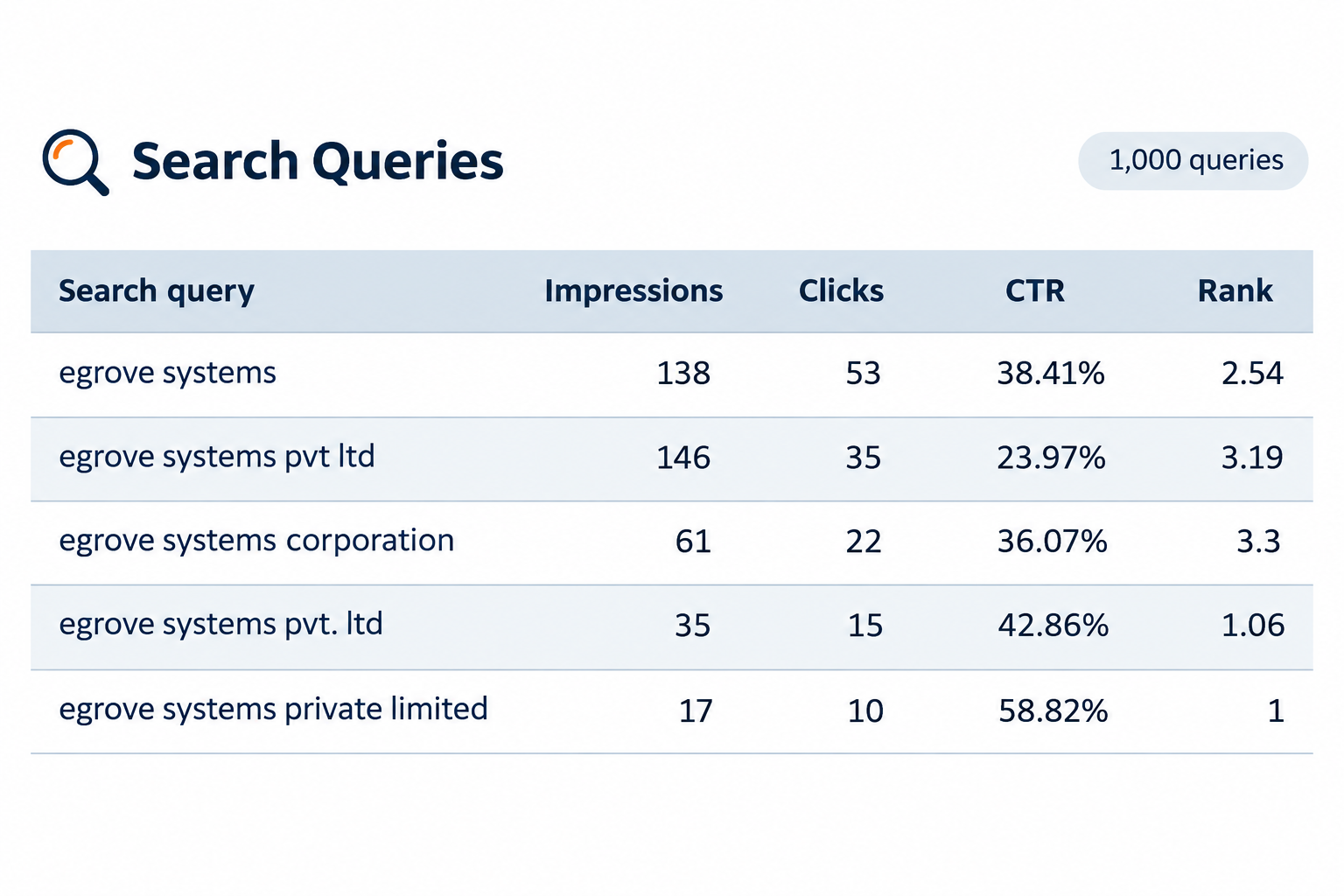
Review query-level performance
– Query: The search term reported for your website.
– Clicks: Clicks from that query during the selected period.
– Impressions: Search-result appearances associated with the query.
– CTR: Clicks divided by impressions.
– Average position: The reported average position for the query.
– Date range: Choose a reporting period to review recent or historical performance, within the integration’s available data.
Find useful content opportunities
Select website and date range
Select your Search Console-connected website and a date range.
Review search queries
Sort or review queries by clicks, impressions, CTR, or average position where available.
Identify relevant keywords
Identify terms that are relevant to your products, services, and audience.
Check ranking pages
Check which page appears for each query using Search Console or the related page report.
Evaluate content improvements
Decide whether an existing page should be improved or whether more research is needed.
Track keyword rankings
Track selected terms separately in an ESO keyword campaign if you want ongoing rank tracking.
Search Queries Reports
Search Queries reports show observed search data. Keyword Suggestion and Rank Checker support different workflows: exploring additional keyword ideas and monitoring selected terms, respectively.
Search Console data has limits
Google may omit or anonymize some query data for privacy, and report values can differ from other platforms. A query’s average position is not a guaranteed rank for every searcher. Use the selected date range and property consistently when comparing reports.
Frequently asked questions
Where does Search Queries data come from?
The report uses Search Console query performance data available to the connected website property. It is not a list of every search made by users.
Why are some queries missing?
Search Console may omit or anonymize some queries, and the available data depends on property permissions, date range, and reporting limits.
What does average position mean?
It is the average position reported for the query over the selected period and applicable search-result impressions. It can vary by device, location, query context, and time.
Does a high-impression query always need a new page?
No. First review the query’s intent and the page that already appears for it. The best next step may be to improve an existing page, create supporting content, or make no change.
Can I track a query’s rank over time?
You can add selected keywords to an ESO Rank Checker campaign, subject to your account’s campaign and keyword limits. Rank Checker data is a separate report from Search Console query performance.