
AI AUTO FIX + AUTO DEPLOYMENT

From website issues to approved improvements.

Turn ESO report findings into proposed code or content fixes. Review each change, approve it, then apply it through your connected workflow.

You review. You approve. You stay in control.
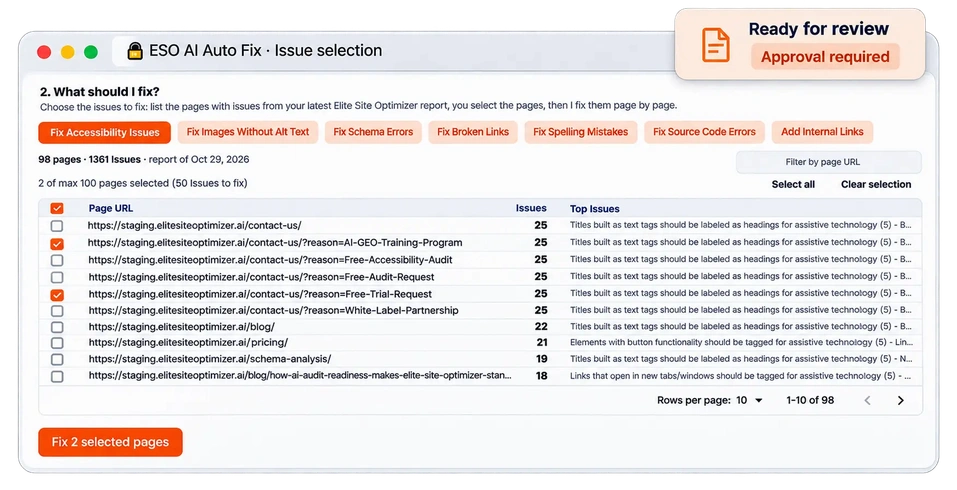
ESO AI Auto Fix Dashboard px
h

Before-and-after review

Automatic syntax checks

Approval before application

Fix the issues holding your website back.

AI Auto Fix turns supported report findings into proposed changes, with a before-and-after view and an automatic syntax check.

Missing image alt text

Invalid schema

Broken links

Spelling mistakes

HTML errors

A clear path from report to deployment.

01

Run an ESO report

Find issues across your website.

02

Connect your project

Choose Git, ZIP, WordPress or Shopify.

03

Select and review

Choose issues and inspect each proposed change.

04

Approve and apply

Deliver fixes through your connected workflow.

You review each change, approve it, and then apply it through your connected workflow.

Illustrative Change
Illustrative change
✓ Syntax check passed
◷ Awaiting approval
− <img src="team.jpg">
+ <img src="team.jpg" alt="Our team">

Connect your website or project.

Project Connection Fix delivery
GitHub project GitHub repository Separate branch and pull request
Other Git project Repository URL Separate branch for review
No repository Upload a ZIP Patch file and fixed ZIP
WordPress Application password or theme repository Content update or theme pull request
Shopify Admin API token or theme repository Theme update with originals backed up

Your main branch and live site remain unchanged until you approve and apply the fix.

Your code stays with ESO.
ESO’s AI runs on its own GPU server. Code is not sent to outside AI services.

Built for your technology stack.

Node.js
React
PHP
Django
HTML
Next.js
Laravel
WordPress
Shopify

Ready to move from findings to fixes?

Review AI-generated changes and deploy approved improvements with ESO.

Frequently asked questions.

Can AI Auto Fix change my live site without approval?

No. You review and approve fixes first.

Do I need a developer?

A developer should review and merge code changes.

Can I use it without Git?

Yes. Upload a ZIP, or connect WordPress or Shopify directly.

How many issues can a run cover?

By default, up to 100 pages and 25 issues per page.